Too vast to handle
Some of us might not be familiar with Biztalk, but for those who have been dealing with integration solutions is Biztalk a legendary beast (speaking as MS pro-fan 😊). If interested go to this site
For smaller solutions however, Biztalk would be an overkill depending on which customer or organization you are trying to help.
On the other hand, your organization or the one you are helping with might already have Biztalk as it’s integration platform in place but it happens that for newer solutions, Biztalk might not be within the strategy map for whatever reason and you are asked to find such a solution… simply hands-off with Biztalk!
Just to point out that this need not be Biztalk as an integration platform 😉.
Depending on your use-case, Biztalk or whatever you integration platform probably is just too vast to handle.
A scenario
The scenario which we would like to achieve here is the pub-sub pattern where the use of MSMQ is extensive.
As an integration guy, you might say, eh? What about servicebus? Yes of course! What we are trying to present here is an alternative way to go. That would be a whole different topic (and the internet of course has a bunch of such topics already!) as well. There are many ways to kill a <—> fill in the blank 😁.. i would not have some pet loving organizations running after me.😆
But for the sake of information, here is a comparison between the cousin (azure storage queues) of what i am about to present and servicebus if you are interrested on the topic.
Another azure technology which would probably cross your mind is logic apps. LA has no native connector to directly connect to MSMQ. It only has IBM MQ (both for Enterprise and ISE connectors) currently when it comes to distributed enterprise queues.
Instead of queues
Instead of using azure storage queues as a container for our messages, we use (block) blobs instead. This adds more storage capability than it’s cousin (up to 1 PB/mo for a reserved capacity). For a more detailed pricing list, refer here.
On the downside, as well with it’s cousin, there is no out-of-the-box (OOB) capability for handling FIFOs (first-in-first-out pattern).
Pre-requisites
You will need an Azure account for this if you don’t have one and of course some knowledge of Azure storage particularly blobs.
Set up an azure container storage (blob) for the purpose of this exercise. Choose the resource group of your choice.
Nowadays i use Azure templates (still on a preview stage) to deploy my resources. It’s easy and intuitive… and i’m getting old and lazy. 😄
The template below can be used to create such a deployment template for the azure container blob storage we are about to use.
{
    "$schema": "https://schema.management.azure.com/schemas/2015-01-01/deploymentTemplate.json#",
    "contentVersion": "1.0.0.0",
    "parameters": {
        "storageAccounts_name": {
            "defaultValue": "maesazcopy67",
            "type": "String"
        }
    },
    "variables": {},
    "resources": [
        {
            "type": "Microsoft.Storage/storageAccounts",
            "apiVersion": "2019-06-01",
            "name": "[parameters('storageAccounts_name')]",
            "location": "westeurope",
            "sku": {
                "name": "Standard_LRS",
                "tier": "Standard"
            },
            "kind": "BlobStorage",
            "properties": {
                "networkAcls": {
                    "bypass": "AzureServices",
                    "virtualNetworkRules": [],
                    "ipRules": [],
                    "defaultAction": "Allow"
                },
                "supportsHttpsTrafficOnly": true,
                "encryption": {
                    "services": {
                        "file": {
                            "keyType": "Account",
                            "enabled": true
                        },
                        "blob": {
                            "keyType": "Account",
                            "enabled": true
                        }
                    },
                    "keySource": "Microsoft.Storage"
                },
                "accessTier": "Hot"
            }
        },
        {
            "type": "Microsoft.Storage/storageAccounts/blobServices",
            "apiVersion": "2019-06-01",
            "name": "[concat(parameters('storageAccounts_name'), '/default')]",
            "dependsOn": [
                "[resourceId('Microsoft.Storage/storageAccounts', parameters('storageAccounts_name'))]"
            ],
            "sku": {
                "name": "Standard_LRS",
                "tier": "Standard"
            },
            "properties": {
                "cors": {
                    "corsRules": []
                },
                "deleteRetentionPolicy": {
                    "enabled": false
                }
            }
        },
        {
            "type": "Microsoft.Storage/storageAccounts/blobServices/containers",
            "apiVersion": "2019-06-01",
            "name": "[concat(parameters('storageAccounts_name'), '/default/test')]",
            "dependsOn": [
                "[resourceId('Microsoft.Storage/storageAccounts/blobServices', parameters('storageAccounts_name'), 'default')]",
                "[resourceId('Microsoft.Storage/storageAccounts', parameters('storageAccounts_name'))]"
            ],
            "properties": {
                "publicAccess": "Blob"
            }
        }
    ]
}
Alternatively you can download the template here. And use the deployment set you are comfortable with.
After you have managed to deploy the storage, then we need to set the SAS (shared access signature) to access the resource.
See to it that “Allowed services” – Blob is checked. See below.
You can edit the appropriate properties for sas to your needs.

Download AzCopy from here.
Remember this:
If you choose not to add the AzCopy directory to your path, you’ll have to change directories to the location of your AzCopy executable and type
azcopyor.\azcopyin Windows PowerShell command prompts.
Moulding it up together
Now that we have our kits in place, all we need to do is run it.
Suppose you have convinced your client that all messages that you would be handling will now be sent to a (shared) catalog instead of MSMQ in particular that has been handled in a queue.
And for simplicity sake, suppose we put those messages in “c:\workspaces\AzCopy\out”.
The following (powershell) script template would look like below:
PS .\azcopy cp "C:\workspaces\azcopy\out" "https://<your-storage-account>.blob.core.windows.net/test?<your SAS token>" --recursive=true
The recursive parameter above implies that subdirectories are included. If you have not changed the name of the blob storage in the ARM template above, then “/test” in the storage uri represents this.
Try putting som files in the catalog above and run the script. The files should then be copied to the above container. It should look like below.
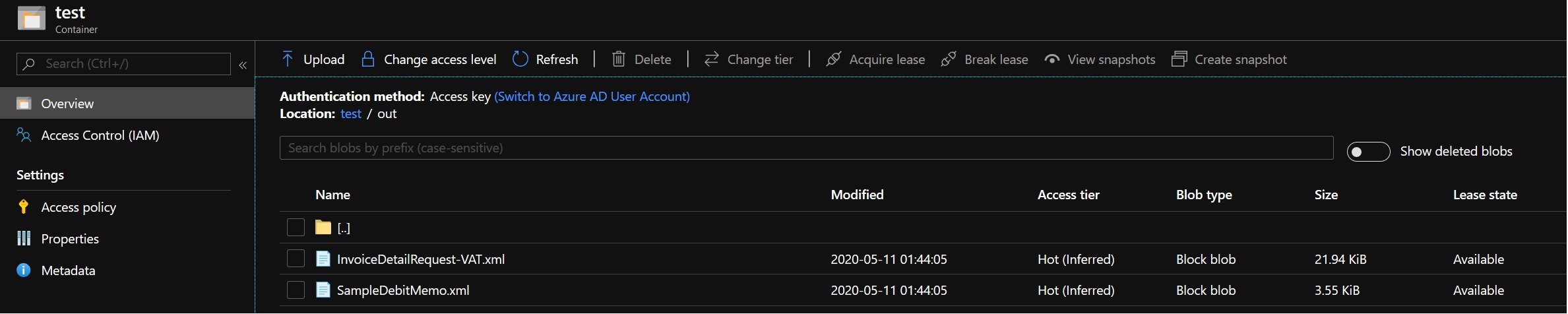
In my example, i have two (2) files that i send to the blob storage — InvoiceDetailRequest-VAT.xml and SampleDebitMemo.xml.
And a (successful) status log would even be seen on the PS console reporting that two (2) files has been transferred as shown below.
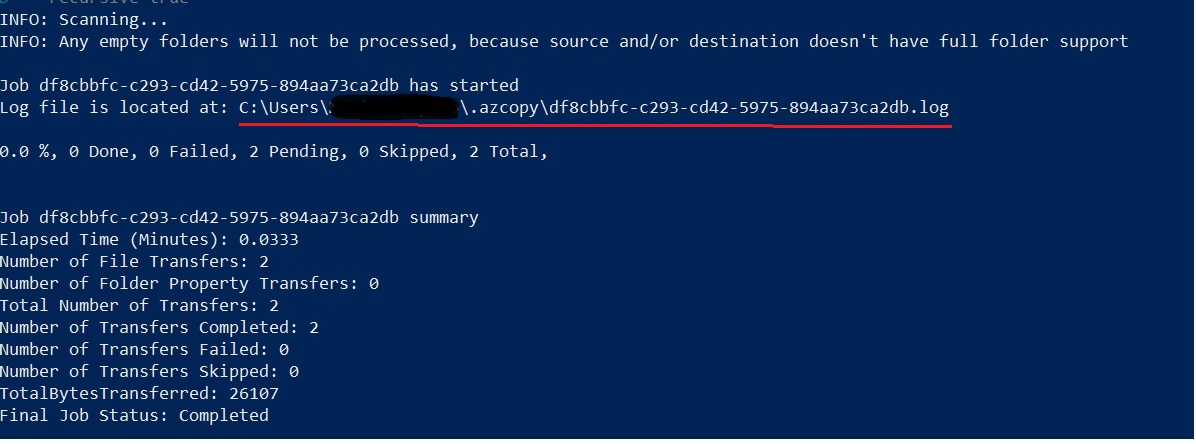
In order to complete mimicing Biztalk, then we should clean up our source resource. This would be the path to where our files (messages). AzCopy does not automatically deletes those files (messages). We do it explicitly.
This can be achieved by using PS “Remove-Item” command.
As per example above, it would look like this:
PS C:\workspaces\azcopy\cmd> Remove-Item -path C:\workspaces\azcopy\out\* -include *.xml -recurse
Then include parameters only deletes/remove items which are of type xml documents.
An integration platform like Biztalk do the polling interval internally within the platform itself thru it’s adapter artifact (either thru MSMQ adapter or WCF-NetMsmq LOB adapter).
In order to mimic this, we can use (Windows) Task scheduler to schedule the PS script that we just ran.
Subscribers
Until now, we are still handling the publishing of messages in a pub-sub pattern. To complete the cycle, we can then do subscribing on different techniques as well.
Pull
We can use either logic apps or azure functions (thru binding) to subscribe to our blob storage or rather use azure (blob) storage triggering.
Push
We can use an event subscriber for our blob storage to notify interested parties for our messages.
Some things to consider
The following were not taken into consideration within this exercise and it’s up to you to find those enhancements as an architect and/or developer together with your requirement challenges:
- Message suspension when a glitch or communication disturbance is at hand.
- Re-sending of messages when an above scenario occurs.
- Local storage security and infrastructure.
- FIFO capability is not in scope… you might then consider Az SB in that case.
- Other non-functional requirements with regards to a use-case (UC).
Summary
In this exercise showed an alternative way of mimicing a Biztalk capability for pub-sub pattern (MSMQ in particular) which can be done with the following resources/components:
- AzCopy
- Azure (Blob) storage (+ logic apps or azfunc)
- Windows task scheduler
 Spice n' see
Leave a comment